nose2music
Table of Contents
Overview
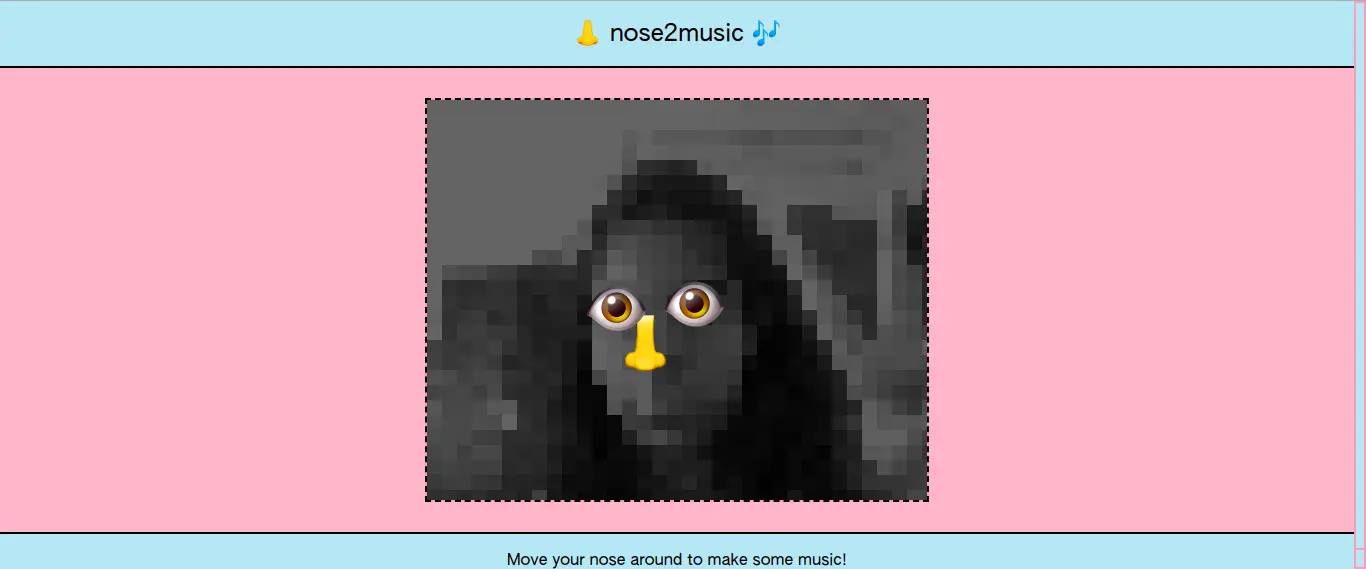
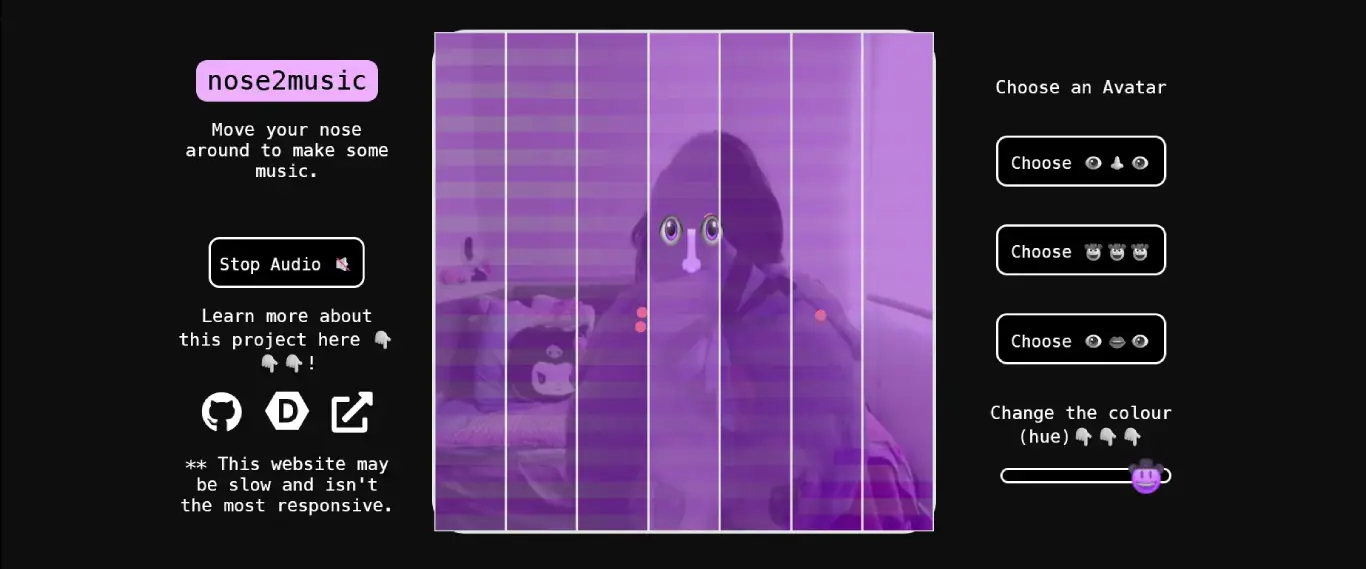
nose2music was my submission to the BitRate - Machine Learning & Music Series hackathon, back in August 2020. The premise? Your webcam tracks your nose in real time, and as you move your head, it plays music. The canvas is divided into seven vertical bars, each mapped to a note, and whenever your nose passes a bar across the screen, it plays the note from that bar.
Now, I could wax poetic about how it was for increasing accessibility for a specific minority group, but it really wasn't anything like that. It was just one of my first real browser-based creative coding projects, built entirely in client-side JavaScript with no backend. My main goal at the time was to create something cool for the hackathon, and learn a lot within the given time crunch, which I did end up doing.
| nose2music's original look | nose2music newer look |
|---|---|
 |
 |
Inspiration
I'd been watching a lot of Daniel Shiffman's Coding Train videos around this time. His enthusiasm for creative coding with p5.js was infectious. The hackathon ran workshops covering ml5.js, and I saw projects using p5-audio and Tone.js with midi, which gave me an early look at how machine learning could look in the browser. It didn't have to be serious or tedious to be art.
I ended up choosing the nose as the main part of the tracker as it is a central part of the face. I guess I could have also used something like the distance between the eyes, which would be closer to how eye and face tracking takes place in current XR systems. The nose specifically felt like a funnier tracking target than a full face bounding box.
How It Works
The stack is entirely client-side:
| Library | Version (2026) | Role |
|---|---|---|
| p5.js | 1.7.0 | Canvas rendering, webcam capture, draw loop |
| ml5.js | 0.12.2 | PoseNet model, detects body keypoints from video |
| Tone.js | 14.8.49 | Web Audio synthesis, plays notes via a PolySynth |
The data flow is straightforward:
⚠️ Excalidraw SVGs not found: images/garden/nose2music/excalidraw-light.svg / images/garden/nose2music/excalidraw-dark.svg
The Bar System
The canvas is split into 7 equal vertical bars, each assigned a note from a fixed scale:
let notes = ["Db4", "F4", "A4", "C5", "Eb4", "D3", "F5"];
Each bar is an instance of a Bar class that tracks its own position, width, and visual alpha:
class Bar {
  constructor(x, w) {
    this.x = x;
    this.y = 0;
    this.w = w;
    this.h = height;
    this.a = 25; // alpha, visible when active
    this.note = 0; // 0 = not playing
  }

  play(n) {
    this.a = 15;
    this.note = n;
  }
  notPlay() {
    this.a = 0;
    this.note = 0;
  }
}
Every frame, drawKeypoints() checks which bar the nose's x-coordinate falls into, calls play() on that bar, and notPlay() on the rest. Then triggerSynth() fires on a Tone.js transport loop ("4n" - every quarter note), collects the active notes, and sends them to a PolySynth:
function triggerSynth(time) {
  for (let i = 0; i < numBars; i++) {
    playNotes[i] = bars[i].note != 0 ? notes[i] : 0;
  }
  synth.triggerAttackRelease(playNotes, "8n");
}
The Visual Layer
The canvas has its base as the raw video feed coming in from the webcam, and then a few additional layers get composited on top of it:
lowResDraw(): samples the webcam pixels at a 15px grid resolution (res = 15) and redraws them as coloured rectangles, giving it a pixelated/mosaic lookmirrorVideo(): flips the canvas horizontally via a WEBGLscale(-1, 1, 0)so it feels like a mirrordrawPoses(): overlays a chosen "avatar" image on top of the nose keypoint (and optionally the eyes)hueRotate.js: a slider in the UI applies a CSShue-rotate()filter to the entire<body>, shifting all the colours at once
The avatar images (face1.png, cowboy.png, face2.png) get rendered centered on the nose keypoint position 🤠
Development Timeline
August–September 2020; the Hackathon sprint
The whole thing was built over about two days. From August 30th to September 9th I followed the typical hackathon pattern, to get something barely working, iterate fast, polish last (if time permits).
- August 30th: stripped out some earlier server-side experiments, first functional version
- August 31st: hand tracker added, Tone.js integrated, deployed on Netlify
- September 1st: mirrored video, filters,
lost sound?(a commit that says it all), low-res video setup - September 9th: fixed formatting and bugs, added some tint
The lost sound? commit on September 1st is where the audio broke mid-sprint and I couldn't fix it before submission. sketchOld.js is roughly what was submitted. Tone.js was initialised at the top level, which meant the AudioContext started immediately without any user gesture, and browsers began blocking this.
March 2021: Visual overhaul
Six months later, I added some significant updates to make things look good on my résumé:
- Avatar selector added (
chooseImg1/2/3, three button choices in the UI) - Improved responsiveness (the mobile layout with
flex-direction: column-reversecame in here) - Hue rotation slider added
- Keypoint drawing refactored. The old
sketchOld.jshad seven separateifblocks checking each bar one by one. The new version loops overbars[]cleanly
December 31, 2023: The NYE audio fix attempt
Three years later, on New Year's Eve, I tried to fix the audio for real. I think I just looked at it because I was bored lol.
The root cause was clear because I had gotten much better at debugging by then. Browsers require AudioContext to be created (or resumed) inside a user gesture handler. The old code called new Tone.PolySynth(...).toMaster() at the module level, which led to the context being blocked instantly.
The fix was moving everything into a button click handler:
// resumeAudioContext.js
let audioContext;
function initAudioContext() {
  if (!audioContext) {
    audioContext = new AudioContext();
  } else {
    audioContext.resume();
  }
}
And in sketch.js, the Play/Stop button now does the full Tone.js startup sequence:
playAudioBtn.mousePressed(async () => {
  if (!audioStarted) {
    await Tone.start();
    await Tone.loaded();
    synth = new Tone.PolySynth(Tone.Synth, {
      maxPolyphony: numBars,
    }).toDestination();
    Tone.Transport.scheduleRepeat(triggerSynth, "4n");
    Tone.Transport.start();
    audioStarted = true;
    playAudioBtn.html("Stop Audio 🔇");
  } else {
    Tone.Transport.stop();
    audioStarted = false;
    playAudioBtn.html("Play Audio 🔊");
  }
});
January 2026: The most recent update, refresh-2026 branch
The most recent update:
- Updated all three libraries to current versions (p5.js 1.7.0, ml5.js 0.12.2, Tone.js 14.8.49)
- Improved the audio context handling
- Tidied up the CSS.
- Switched from
.toMaster()(deprecated in Tone.js v14) to.toDestination(). This is the version currently deployed.
Try It Out
Allow webcam access when prompted. Click Play Audio 🔊 first, as the audio won't start until you do. Works best on desktop in Chrome or Firefox.